



Abstract
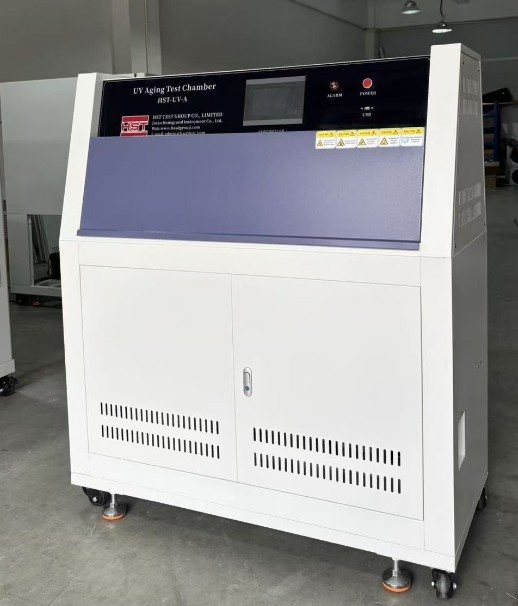
The HST-UV-A is a Programmable UV Aging Test Chamber whose touch screen controller runs two test modes - fixed value and multi-segment program - shows the current irradiation intensity and blackboard temperature live, accumulates the front and back lamp hours, and keeps a full data trail: real-time curves, historical data and curves, and alarm records, all exportable to a USB flash drive. The controller set range spans -200.00 to 400.00, the condensing temperature zone sets from 0.00 to 600.00, and the rain pattern runs continuous or periodic, so one chamber carries both simple UV exposure checks and long, multi-condition aging protocols with the record of every run.
Key Takeaways
- Two test modes on one screen: fixed value (one condition for a set time) and program (multi-segment runs with per-segment mode, lamp selection and a settable cycle count).
- The running screen shows the current irradiation intensity and blackboard temperature alongside the condensing temperature and humidity.
- Cumulative front and rear lamp hours are kept on screen, giving a running lamp-hour record for replacement planning.
- The rain pattern is selectable as continuous or periodic, pairing UV exposure with condensing cycles in the same run.
- Every run leaves a data trail: real-time curves, historical data, history curves and alarm records - exportable to USB flash drive.
- A multi-user lab setup is supported: user management with login, a parameter lock, language selection, appointment (scheduled) start, and stop / cold start / hot start behaviour after a power interruption.
What the HST-UV-A is for
The HST-UV-A is a UV aging test chamber: specimens sit inside the test chamber while the UV lamps expose them under controlled conditions, with a condensing side and a selectable rain pattern that pairs the light exposure with moisture. The manual describes the machine's controller in depth, and that is where the value for a lab sits - not just in running an exposure, but in running it as a defined, repeatable, recorded protocol.
- Fixed value (FIX) mode sets the conditions for a defined run time, the straightforward choice for a single-condition exposure check.
- Program mode lets the operator edit the protocol by hand: segments, per-segment mode, lamp selection, cycles, and standby steps, for protocols that change condition as they run.
- The same screen, curve display and data export serve both modes, so the lab keeps one workflow whether the run is simple or stepped.
Two test modes, one screen
The system main screen offers the fixed value experiment, the program experiment, the operation setting, the fault recording and the appointment setting as the five entry points.
- In fixed value mode the operator sets the condition and the running time of the fixed value, chooses the rain pattern as continuous or periodic, and starts the run; the screen then tracks the running time and the remaining time until the cycle ends.
- In program mode the operator edits a program first - number and name, segment by segment - then selects the program number and runs it, with the segment mode, the time signal and the front and rear lamps set per segment and the number of cycles set for the whole run.
- A standby setting sits under both modes: a standby switch, a condensing temperature zone and a standby time, so the chamber can hold between steps of a longer plan.
- A Hold control keeps the current state; a second tap releases the hold. Skip moves the run straight into the next section, and Stop ends the operation.
How a program run is edited and read
The program editing screen is the heart of the machine's flexibility:
- Program number and program name are editable, so protocols are identified by meaning, not by index.
- The segment number and the test mode of the current segment are shown, with the time signal of the current period and the three modes of the current segment set on the same screen.
- Whether the front and rear lamps run is selected per segment, and the program connection (range 0-120) and the number of cycles complete the definition.
- Page up and page down move through a longer program, and the standby setting is reachable from the edit screen.
While a program runs, the running screen shows how long the program has been running and how long is left, and the Hold, Skip and Stop controls cover the day-to-day interventions a lab actually needs.
What the screen keeps for you
The controller is built to record, not just to run:
- The current irradiation intensity and blackboard temperature are displayed live, next to the current condensing temperature and humidity and the set values.
- The cumulative turning on time of the front and rear lights is kept on screen - a running lamp-hour count the lab can use to plan replacements.
- The real-time curve screen plots the current and set values as four colour-coded curves, with show or hide per channel, zoom in and out, screen movement, cleaning, and export of the current curve screen to a USB flash drive.
- The historical data screen lists past runs with search by segment, single or full deletion, and USB export of the data; the history curve screen gives the same zoom, pan and export treatment to the recorded curves.
- The alarm history record stores the DI fault records with fault names, supports deleting one or all entries, exporting one or all, and searching a defined time period.
- The curve display range (available -100 to 400) and the sampling cycle time are settable in the curve setting, so the record matches what the lab wants to see.
- The appointment setting stores the system time and a scheduled start, so a fixed value task or a program task can be queued to begin at a set time.
HST-UV-A controller specifications
Set ranges
- Set value range: -200.00 to 400.00
- Condensing temperature zone: 0.00 to 600.00
- Curve display range: -100 to 400
Program
- Modes: fixed value (FIX) experiment and program experiment
- Program definition: number, name, segment number, per-segment test mode, time signal, three segment modes, front and rear lamp selection, program connection (0-120), number of cycles, standby setting
- Run controls: run, hold (maintain current state), skip (next section), stop
Measurement display
- Current and set condensing temperature and humidity
- Current irradiation intensity and blackboard temperature
- Cumulative turning on time of the front and back lights
- Rain pattern: continuous or periodic
Recording and export
- Real-time curves: four colour-coded channels, show/hide, zoom, pan, clean
- Historical data and history curves with segment search and time-period search
- Alarm history record (DI faults) with single or full delete and export
- USB flash drive export for curves, historical data and alarm records
System settings
- Language selection
- Power interruption behaviour: stop, cold start, hot start (restore the state before the power failure)
- Backlight time (0 = never extinguished) and parameter lock
- User management with login, login duration setting, add user, and touch screen calibration
- Appointment (scheduled start) setting with system time
Selection guide: where the HST-UV-A fits
- Your protocols are stepped - the condition changes through the run, lamps switch between segments, or the run repeats a cycle block - and program mode with per-segment settings is the right tool; a single-condition exposure check runs fine in fixed value mode on the same machine.
- You need the record, not just the result: the curve, history and alarm export to USB keeps the evidence of every run on the lab's own storage.
- Several operators share the chamber: user management with login plus the parameter lock keeps each user's session separate and the parameters protected.
- The lab runs overnight or over the weekend: the appointment setting starts the task at the scheduled time, and the hot start setting restores the pre-failure state after a power interruption.
- If the protocol is pure temperature and humidity conditioning without UV exposure, the environmetal test chamber family on the HST site is the line to look at instead.
- This article is written from the controller manual; the chamber hardware options (test chamber size, lamp configuration) follow the HST-UV-A product page rather than this document.
Total cost of ownership
- The cumulative front and rear lamp hours are tracked on screen, so lamp replacement is planned from a recorded count.
- The data trail lives on a USB flash drive - no separate data logger or computer station is part of the documented setup.
- The hot start option (restore the state before the power failure) protects a long run when the power drops mid-run.
- The standby setting between program steps lets one run span a break in the schedule without re-keying the protocol.
Compliance and documentation
The unit ships with HST's quality certificate: product UV Aging Test Chamber, model HST-UV-A, serial no. 20250766-2, stating that the equipment was inspected, proved to satisfy the technical requirements, and is permitted for delivery. The controller manual itself documents the five main entry points, both experiment modes, the curve and history functions, the operation settings, the alarm record and the appointment setting. The manual does not list test standards for this model, so no standard claims are made here.
Frequently Asked Questions (FAQ)
1. What test modes does the HST-UV-A controller run?
Two: fixed value (FIX) - one set condition for a defined running time - and program, where the operator edits the segments, per-segment mode, lamp selection and cycle count before running.
2. What does the running screen show during a test?
The current condensing temperature and humidity with their set values, the current irradiation intensity and blackboard temperature, the cumulative front and rear lamp hours, the running and remaining time, and the current status and location.
3. How is the rain pattern controlled?
It is selectable as continuous or periodic in the value setting screen, so the condensing side runs as a steady or a cycling part of the protocol.
4. Can I export the data from a finished run?
Yes - the current curve screen, the historical data and the alarm history records are all exportable to a USB flash drive, and the historical data can be searched by segment before export.
5. What happens if the power drops mid-run?
The operator chooses the power-on behaviour in the operation setting: stop (restore the stop state), cold start (restart the operation), or hot start (restore the state before the power failure).
HST GROUP – Focus on Material Test. Kindly contact HST Group via WhatsApp at +86 15910081986.